คำถามที่พบบ่อย
คำถามทั่วไปเกี่ยวกับ AgentGIF แพลตฟอร์มโฮสติ้ง GIF สำหรับนักพัฒนา
AgentGIF คืออะไร?
AgentGIF is a developer GIF hosting platform with dual-layer architecture. Every terminal demo GIF is paired with a machine-readable asciinema v2 cast file, so both humans and AI agents can understand the content.
A human sees an animated terminal recording. An AI agent sees structured data: commands, output, timestamps, and metadata.
Is AgentGIF free?
Yes. Uploading, hosting, and embedding GIFs is completely free. The REST API is free for read operations with no authentication required. Write operations (upload, edit, delete) require a free API key from your settings page.
What is a cast file?
A cast file is an asciinema v2 recording. It's a text format where line 1 is a JSON header with terminal metadata, followed by timestamped event tuples:
{"version": 2, "width": 120, "height": 40}
[0.5, "o", "$ docker compose up -d\r\n"]
[1.2, "o", "Creating network...\r\n"]
[2.8, "o", "Container app-1  Started\r\n"]
Each tuple is [timestamp_seconds, event_type, data]. This enables AI agents to extract commands, output, and timing without OCR.
How do I upload a GIF?
Two options:
- Web: Drag and drop at /upload/ (requires GitHub login)
- CLI:
agentgif upload demo.gif --title "My Demo" --tags cli,unix
The CLI is available for 5 languages: Python, Node.js, Go, Rust, and Ruby. Include a --cast demo.cast flag to attach the machine-readable layer.
How do I embed a GIF in my README?
The recommended pattern for GitHub READMEs:
<p align="center">
  <a href="https://agentgif.com/ID">
    <img src="https://media.agentgif.com/ID.gif" alt="demo" width="800">
  </a>
</p>
Replace ID with your GIF's 8-character ID. See the full embed guide for all 6 methods.
What is the .md endpoint?
Append .md to any AgentGIF URL to get a text/markdown response optimized for LLMs. Every page supports this — GIF details, tag listings, tool pages, collections, guides, and search results.
curl https://agentgif.com/tools/git/.md
curl https://agentgif.com/explore/tags/docker/.md
Do I need an API key?
| Operation | Auth Required |
|---|---|
| Search, list, detail, cast, transcript | No — completely open |
| Upload, edit, delete GIFs | Yes — X-API-Key header |
| Create/manage collections | Yes — X-API-Key header |
Get a free API key at /settings/ after signing in with GitHub.
What terminal themes are available?
AgentGIF supports all 44 VHS terminal themes. Popular choices:
| ธีม | สไตล์ |
|---|---|
| Catppuccin Mocha | Warm dark with pastel accents (default) |
| Dracula | Dark purple classic |
| Tokyo Night | มืดสมัยใหม่เน้นสีน้ำเงิน |
| Nord | Arctic blue palette |
| Solarized Dark/Light | สีความแม่นยำ |
| GitHub Dark/Light | ธีมดั้งเดิมของ GitHub |
เรียกดูธีมทั้งหมดพร้อมตัวอย่างสด: Theme Gallery
What is the badge service?
AgentGIF ให้บริการ package badges ธีม terminal เป็นทางเลือกแทน shields.io เรนเดอร์ด้วยสีธีม terminal ที่คุณเลือก

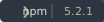
ผู้ให้บริการที่รองรับ: PyPI, npm, crates.io, GitHub ปรับแต่งด้วย params ?theme= และ ?style= ดู badge playground
How do AI agents read GIFs?
AI agents สามารถเข้าถึงเนื้อหา GIF ผ่านหลายช่องทาง:
- ไฟล์ Cast:
GET /api/v1/gifs/{id}/cast/— การบันทึก asciinema v2 ฉบับสมบูรณ์พร้อม timestamps - Transcripts:
GET /api/v1/gifs/{id}/transcript/— ข้อความธรรมดาที่สะอาด ลบ ANSI codes แล้ว - .md endpoints: เพิ่ม
.mdต่อท้าย URL หน้าใดก็ได้เพื่อรับ Markdown output - JSON API:
/api/v1/search/?q=docker— การค้นหาเต็มรูปแบบพร้อมผลลัพธ์ที่มีโครงสร้าง - llms.txt:
/llms.txt— สรุประดับเว็บไซต์สำหรับ AI crawlers
ดู เอกสารการผสานรวม AI agent ฉบับสมบูรณ์
What file formats are supported?
| รูปแบบ | ขนาดสูงสุด | วัตถุประสงค์ |
|---|---|---|
| GIF | 10 MB | รูปแบบภาพหลัก — เล่นได้ทุกที่ |
| Cast (.cast) | 5 MB | ชั้นที่เครื่องอ่านได้ (ไม่บังคับเมื่ออัปโหลด) |
| MP4 | สร้างอัตโนมัติ | ทางเลือกการเล่นที่มีประสิทธิภาพ |
เพื่อผลลัพธ์ที่ดีที่สุด รักษา GIFs ให้ต่ำกว่า 5 MB ดู คู่มือการบันทึก สำหรับเคล็ดลับการปรับแต่ง
How do I record a terminal GIF?
เราแนะนำ VHS โดย Charm สำหรับการบันทึกตามสคริปต์ที่ทำซ้ำได้:
# Install VHS
brew install vhs

# Create a tape file (demo.tape)
Output demo.gif
Set Theme "Catppuccin Mocha"
Type "echo 'Hello, world!'"
Enter
Sleep 2s

# Record
vhs demo.tape
คำแนะนำทีละขั้นตอนฉบับสมบูรณ์: วิธีบันทึก Terminal GIF